The Ultimate Guide to Database Questions and Answers: Everything You Need to Know

Are you a beginner in the world of databases and have a lot of questions about how they work? Or maybe you’re an experienced professional who wants to brush up on your knowledge and stay up-to-date with the latest trends in database management. Whatever your level of expertise, this article is here to help answer some of the most common questions about databases.
What is a database?
A database is a structured collection of data that is organized and stored in a way that allows for efficient retrieval, manipulation, and management. It is like a digital filing cabinet where information is stored in tables, rows, and columns. Databases are used in various industries and applications, from small businesses to large corporations, to store and manage data.
What are the different types of databases?
There are several different types of databases, each suited for different purposes. Some common types include relational databases, object-oriented databases, hierarchical databases, and distributed databases. Relational databases, such as MySQL, Oracle, and SQL Server, are the most widely used type and are based on the relational model, which organizes data into tables with defined relationships between them.
What is the role of a database administrator (DBA)?
A database administrator (DBA) is responsible for the overall management and maintenance of a database system. Their role includes tasks such as planning and designing the database structure, ensuring data integrity and security, optimizing performance, and troubleshooting any issues that arise. DBAs play a crucial role in ensuring the reliability and efficiency of a database system.
What is a Database? Explained

A database is a structured collection of data that is organized and stored in a computer system. It is designed to efficiently store, manage, and retrieve large amounts of information. Databases are essential for storing and managing data in various applications, such as websites, business systems, and scientific research projects.
At its core, a database consists of tables, which are composed of rows and columns. Each row in a table represents a single record, and each column represents a specific attribute or piece of data. The structure of a database is defined by its schema, which outlines the tables, columns, and relationships between them.
One of the main advantages of using a database is the ability to store and access large amounts of data in an organized and efficient manner. Databases provide a centralized location for data storage and eliminate the need for individual files or spreadsheets. Additionally, databases offer features such as data integrity, security, and scalability, making them suitable for handling complex and evolving data requirements.
There are different types of databases, including relational, object-oriented, hierarchical, and graph databases. Relational databases, such as MySQL and Oracle, are the most commonly used type and use tables to store data with predefined relationships between them. Object-oriented databases, on the other hand, store data in objects and are commonly used in programming languages such as Java.
In conclusion, a database is a structured collection of data that allows for efficient storage, management, and retrieval of information. It plays a crucial role in various applications and provides a centralized and organized approach to data handling. Understanding databases and their functionalities is essential for anyone working with data-intensive systems or applications.
Why are Databases Important?
Databases play a crucial role in managing and organizing vast amounts of data in an efficient and secure manner. They are essential tools for businesses, organizations, and individuals alike, offering numerous benefits and advantages.
Data Storage and Organization: Databases provide a centralized and structured way to store data. They allow for efficient data retrieval, manipulation, and analysis. By organizing data in a logical manner, databases make it easier to access and manage information, ultimately improving productivity and decision-making processes.
Data Integrity and Accuracy: Databases offer mechanisms to enforce data integrity and ensure accuracy. Through the use of constraints, such as unique key constraints or referential integrity, databases prevent inconsistent or invalid data from being stored. This helps maintain the reliability and trustworthiness of the data, which is crucial for making informed decisions.
Data Security: Databases provide features to protect sensitive and confidential data. Access control mechanisms, such as user authentication and authorization, allow administrators to control who can access and modify the data. Encryption and data backup strategies further enhance the security of the stored information.
Data Consistency and Scalability: Databases enable data consistency by allowing multiple users to access and modify the data simultaneously without causing inconsistencies. With proper database design and infrastructure, databases can handle large volumes of data and support numerous concurrent users, making them scalable and capable of handling growing data needs.
Data Analysis and Decision Making: Databases facilitate data analysis by providing powerful querying and reporting capabilities. They allow users to extract meaningful information from large datasets and generate valuable insights. These insights can drive informed decision-making and support strategic planning within organizations.
Overall, databases are essential tools for managing and leveraging data effectively. They provide a structured and secure environment for storing and retrieving information, ensuring data integrity, and supporting data analysis. In today’s data-driven world, databases play a vital role in improving productivity, efficiency, and decision making across various industries and sectors.
Different Types of Databases: A Comprehensive Guide
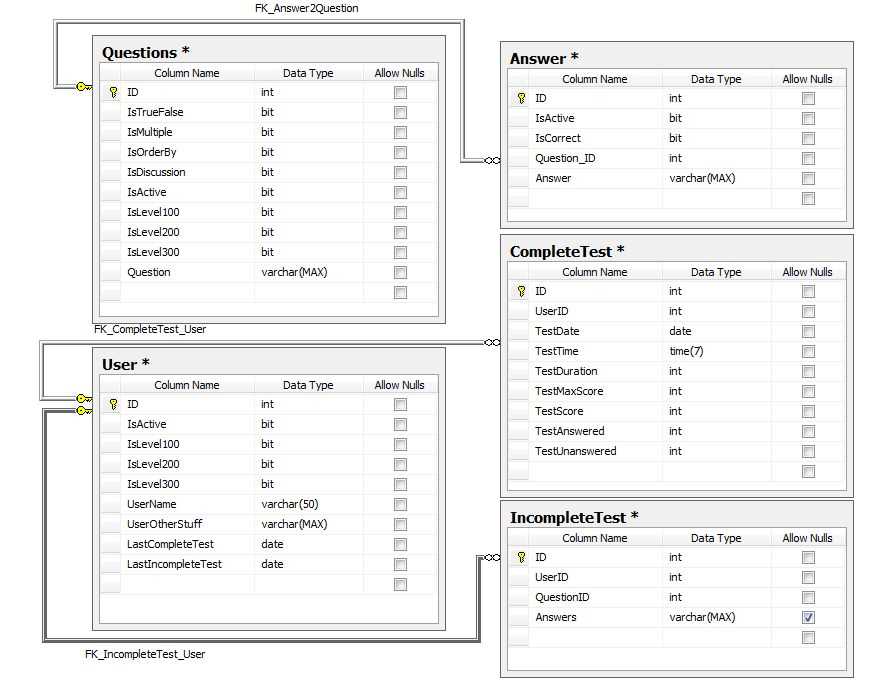
A database is a collection of structured data that can be organized, accessed, and managed efficiently. There are different types of databases used for various purposes, each with its own characteristics and benefits. Understanding the different types of databases can help organizations choose the right database system for their specific needs.
1. Relational Databases: Relational databases are the most common type of database used today. They organize data into tables, with each table consisting of rows and columns. This type of database is based on the relational model and uses SQL (Structured Query Language) as its query language. Relational databases are known for their ability to handle complex relationships between data, making them suitable for a wide range of applications.
2. Object-oriented Databases: Object-oriented databases store data in objects, which are instances of classes or predefined data structures. This type of database is suitable for storing complex, interconnected data, such as multimedia applications or scientific research data. Object-oriented databases allow for the storage of more complex data types and support object-oriented programming languages.
3. Hierarchical Databases: Hierarchical databases organize data in a tree-like structure, with each record connected to a parent record. This type of database is typically used in legacy systems and is well-suited for representing hierarchical data structures. However, hierarchical databases can be challenging to manage and maintain as the data structure becomes more complex.
4. Network Databases: Network databases are similar to hierarchical databases but allow for more flexible relationships between records. They use a network model to represent data, where records can have multiple parent and child records. Network databases are useful for representing complex relationships but can be more difficult to design and maintain compared to relational databases.
5. NoSQL Databases: NoSQL (Not Only SQL) databases are designed to handle large amounts of unstructured or semi-structured data. They use non-relational data models and are highly scalable and flexible. NoSQL databases are suitable for applications that require high performance, such as web applications or big data analytics. Examples of NoSQL databases include MongoDB, Cassandra, and Redis.
In conclusion, understanding the different types of databases is essential for organizations looking to implement a database system. Each type has its own strengths and weaknesses, and choosing the right database system depends on factors such as the nature of the data, the requirements of the application, and scalability needs.
Common Database Management Systems (DBMS)
A Database Management System (DBMS) is a software system that allows users to manage and organize data in a database. There are several commonly used DBMS, each with its own strengths and weaknesses. Understanding the differences between these systems can help organizations choose the most suitable one for their needs.
1. Oracle Database: Oracle is one of the most popular and widely used DBMS. It is known for its scalability and reliability, making it a popular choice for large enterprise applications. Oracle supports a wide range of data types and provides features such as data encryption, backup and recovery, and high availability.
2. MySQL: MySQL is an open-source DBMS that is widely used for web applications. It is known for its simplicity and ease of use. MySQL is compatible with various operating systems and can handle large amounts of data efficiently. It supports multiple storage engines, including InnoDB and MyISAM, and offers features such as replication and clustering.
3. Microsoft SQL Server: Microsoft SQL Server is a popular DBMS for Windows-based environments. It offers a range of features and tools for database management, including support for business intelligence and data analysis. SQL Server also provides high availability and security features, making it suitable for enterprise applications.
4. PostgreSQL: PostgreSQL is an open-source DBMS known for its extensibility and flexibility. It supports advanced features such as full-text search, geospatial data, and JSON support. PostgreSQL is highly reliable and can handle large datasets efficiently. It also has a strong community support and a wide range of extensions and plugins.
- 5. MongoDB: MongoDB is a NoSQL DBMS that is designed for handling unstructured and semi-structured data. It uses a document-oriented data model and stores data in flexible JSON-like documents. MongoDB is known for its scalability and high performance. It is widely used for big data and real-time applications.
These are just a few examples of the common DBMS available in the market. Each system has its own strengths and weaknesses, and organizations should carefully evaluate their requirements and choose a system that best suits their needs.
How to Create a Database: Step-by-Step Guide
Creating a database is an essential step for managing and organizing your data efficiently. Whether you are designing a database for personal use or for a large organization, following a step-by-step guide can help you navigate the process with ease. Here is a detailed walkthrough that outlines the key steps involved in creating a database.
1. Identify your data requirements
Before diving into the actual creation of a database, it is crucial to identify and define your data requirements. This involves understanding the type of data you need to store, its structure, and the relationships between different data elements. Taking the time to properly analyze and plan your data requirements will set a solid foundation for the database creation process.
2. Choose the right database management system (DBMS)

Once you have a clear understanding of your data requirements, the next step is to choose the appropriate database management system (DBMS) for your needs. There are various DBMS options available, each with its own features and capabilities. Researching and evaluating different DBMS options can help you make an informed decision based on factors such as scalability, security, and ease of use.
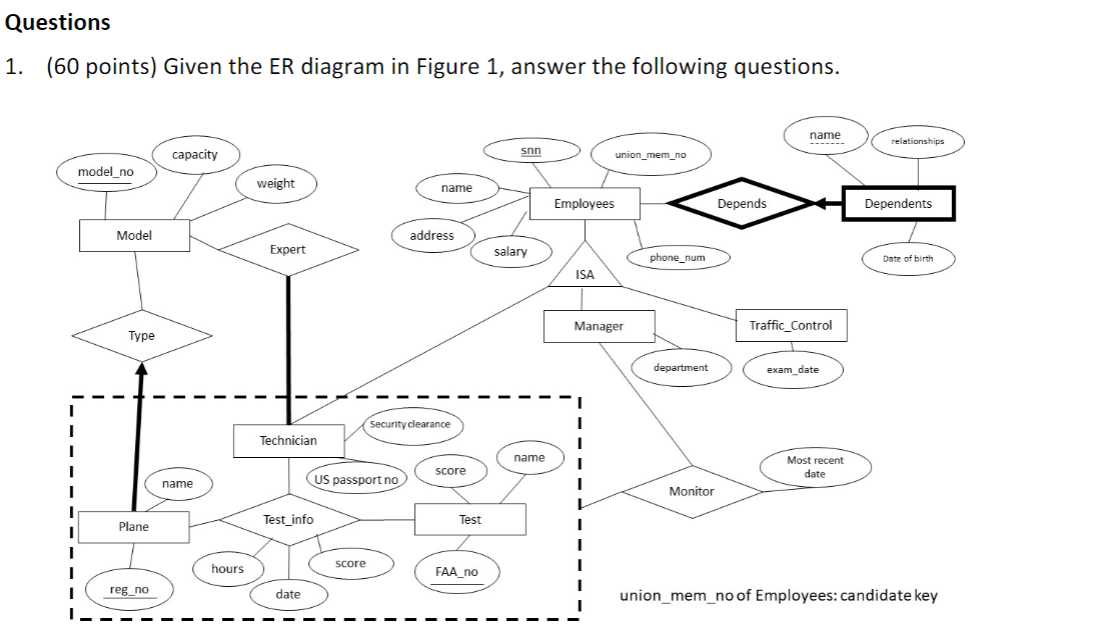
3. Design the database schema
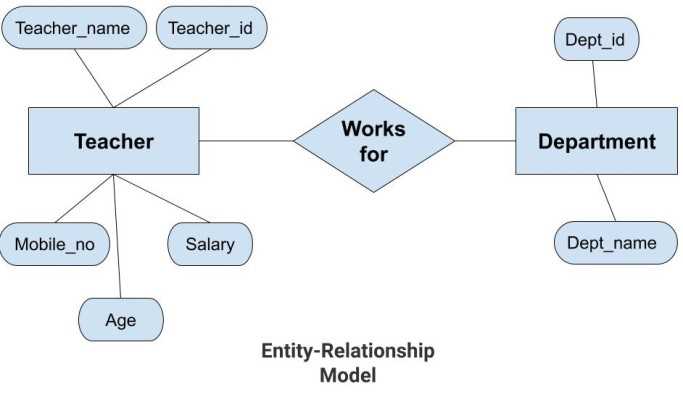
The next step involves designing the database schema, which defines the structure of the database and how the data will be organized. This includes defining tables, columns, relationships, and constraints. A well-designed schema is crucial for efficient data storage and retrieval, as it ensures data integrity and reduces redundancy.
4. Create the database

Once you have finalized the design of the database schema, it’s time to create the actual database. This step involves executing the appropriate commands or using a visual interface provided by the chosen DBMS to create a new database instance. During this process, you will specify the database name, location, and other relevant properties.
5. Define and create tables
After creating the database, the next step is to define and create the tables that will hold the data. Each table represents a specific entity or concept and consists of columns that define the data fields. You will need to specify the table name, columns, data types, primary keys, and any constraints or relationships between tables.
6. Populate the tables with data

Once the tables are created, you can start populating them with data. This involves inserting records into the tables by using SQL statements or other data import methods provided by the DBMS. Carefully inputting accurate and relevant data is crucial for the effectiveness of the database.
7. Test and optimize the database

After populating the database with data, it is essential to thoroughly test its functionality and performance. This involves running queries, performing data manipulations, and ensuring that the database operates as intended. If any issues or bottlenecks are identified, optimizations may be required to enhance the efficiency and speed of the database operations.
By following this step-by-step guide, you can create a well-structured and efficient database that meets your data management needs. Remember to regularly update and maintain your database to ensure its reliability and accuracy.
Conclusion
Database security is of utmost importance in today’s digital age. With the increasing amount of sensitive and personal data being stored in databases, it is crucial to implement effective security measures to protect against unauthorized access and potential data breaches.
By following best practices and implementing the tips mentioned in this article, organizations can significantly enhance the security of their databases. This includes using strong passwords, encrypting sensitive data, regularly patching and updating database software, implementing access controls, and conducting regular security audits.
Remember, no security solution is foolproof, but by taking proactive measures and staying updated with the latest security practices, the risk of a data breach can be significantly reduced. Database security should be viewed as an ongoing process that requires constant vigilance and regular evaluation to stay ahead of potential threats.
Ultimately, prioritizing database security not only helps protect sensitive information but also ensures compliance with data protection regulations, maintains the trust of customers and stakeholders, and preserves the reputation and integrity of the organization.